




The short answer
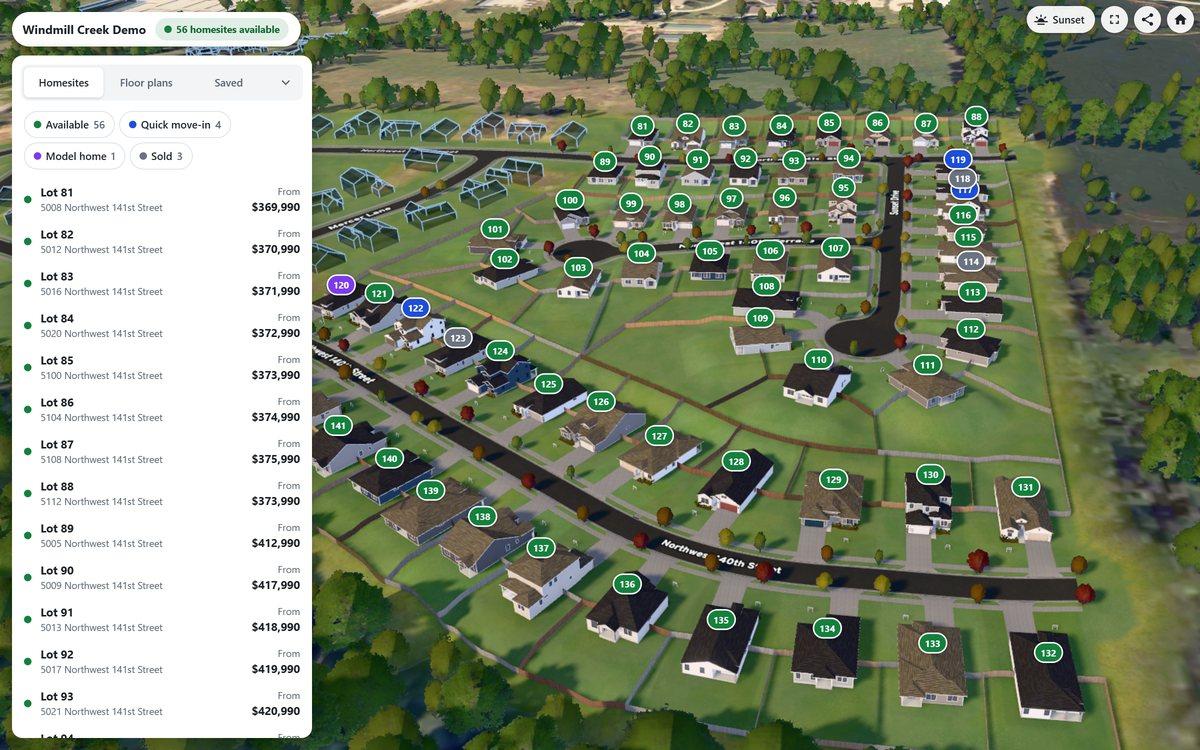
- A 3D community map is an interactive 3D model of a whole new-home community, with its streets, lots and homes, embedded on the builder's own website.
- Buyers fly over it, click any lot for its status, price and size, see the floor plans that fit, and place a home on the lot.
- It goes further than an interactive site plan, which shows the lots as colored shapes on a flat drawing.
- A good one keeps lot status and prices current from the builder's own data, runs in any browser, and sends inquiries with the buyer's choices attached.
- Yes, they exist: Horizon360 is one, and its Windmill Creek demo is open to try.
3D community map or interactive site plan?
Most builder websites show a community as an interactive site plan: a drawing of the lots, colored by status. A 3D community map shows the community itself.
| Interactive site plan | 3D community map | |
|---|---|---|
| What buyers see | A flat drawing of the lots | The whole community in 3D: streets, lots and homes |
| Lots | Colored shapes with a status | Lots in place, with status, price and size |
| Homes | Usually a list of plans beside the drawing | The floor plans that fit each lot, placed on it in 3D |
| Exploring | Zoom and click | Fly over the community, then drop to street level |
| Inquiries | A contact form | An inquiry that arrives with the lot and the home the buyer chose |
What a good 3D community map does
- Keeps lots current. Status, price and the plans for each lot come from the builder's own inventory, so the map changes when a lot sells.
- Shows the homes that fit. Buyers see which floor plans fit a lot and what the home would cost on it.
- Runs on the builder's website. In the browser, on phones and computers, with nothing for buyers to install.
- Sends better leads. An inquiry arrives with the lot and the home the buyer chose.
- Shows what buyers want. Which communities, lots and plans draw interest.
How one is built
With Horizon360, Bryto builds the community in 3D from the builder's site plan, and fills its lots with the builder's floor plans, which are built in 3D for Horizon Model Home from the builder's CAD drawings, material catalogs and option lists. The builder manages lots and prices in the Bryto portal. See how Horizon is priced.
Questions builders ask
Is there a 3D community map for home builders?
Yes. Horizon360 by Bryto puts a builder's whole community on its website in 3D: buyers click any lot for its status and price, see the floor plans that fit, and place one on the lot. The Windmill Creek demo is live to try.
How is a 3D community map different from an interactive site plan?
An interactive site plan shows the lots on a flat drawing. A 3D community map shows the community itself, with its streets and homes, and lets buyers see which floor plans fit a lot and how a home would sit on it.
Does a 3D community map work on phones?
Horizon360 runs in the browser, so buyers open it on the builder's website on a phone or a computer, with nothing to install.
How do lot statuses and prices stay current?
With Horizon360, builders manage each lot's status, price and plans in the Bryto portal, and the map shows them from there.
How is a 3D community map priced?
Horizon360 has one setup per community, whatever its size, plus an annual subscription. It shows the builder's floor plans from Horizon Model Home.
See a 3D community map for yourself
The Windmill Creek demo is a full Horizon360 community, open now with no sign-up.
Rather talk it through? Call (708) 840-1128 or email hello@bryto.com.